
User Manual MG3900
At a glance
- Introduction
- IMPORTANT TO KNOW
- Features (Fig. 1)
- Charging
- Using the appliance
- Changing attachments
- Switching the appliance on and off
- Attachments for use on beard
- Attachments for use on head
- Precision attachments for use on face
- Cleaning
- Storage
- Disposal
- Ordering accessories
- Full Two-Year Warranty
Congratulations on your purchase and welcome to Philips! To fully benefit from the support that Philips offers, register your product at www.philips.com/welcome.
You can find the model number on the back of your product.
The full model number (e.g. MG1234/56) is located on the bottom of the packaging, your receipt or order confirmation.
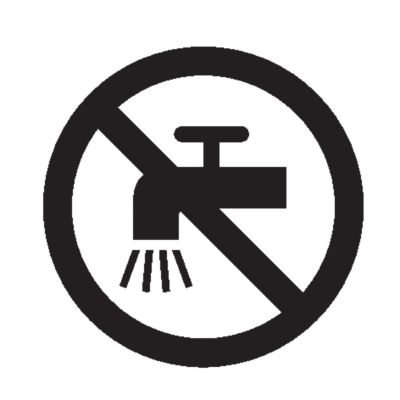
Never rinse the handle under the tap or immerse it in water. Only the cutting element and the attachments can be rinsed under the tap when detached from the handle.
Getting the handle wet may cause irreversible damage to your appliance. This will result in the appliance becoming unusable.
This appliance can only be used without cord.
Switch off the appliance before removing or attaching attachments and before cleaning.
Clean the appliance after each use.
Nose and ear hair trimmer
Precision trimmer
Cutting element
On/off button
Charge indicator
Socket for small plug
USB cable
Note:The power source is not included. A suitable power source (e.g. Philips HQ87) is available via www.philips.com/support.
Stubble comb 1 mm
Beard comb 3 mm
Beard comb 5 mm
Beard comb 7 mm
Hair comb 9 mm
Hair comb 12 mm
Hair comb 16 mm
Not shown: cleaning brush and pouch

Caution
Charging or using the appliance at temperatures below 10 °C or higher than 35 °C adversely affects the lifespan of the battery.
If the appliance is subjected to a major change in temperature, pressure or humidity, let the appliance acclimatize for 30 minutes before use.
Charge the appliance before first use and when the motor starts working more slowly.
It takes 8 hours to fully charge the battery. When the appliance is fully charged, it has an operating time of up to 60 minutes.
Warning: Keep the USB cable and the USB power source dry.
Make sure the appliance is switched off.
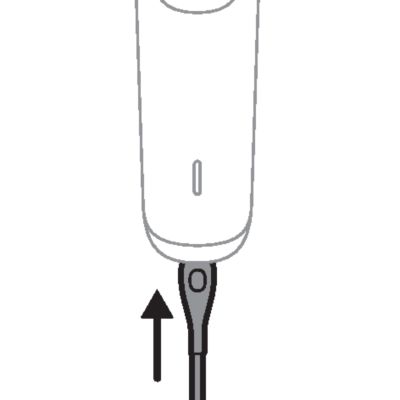
Insert the small plug of the USB cable into the socket in the bottom of the appliance.
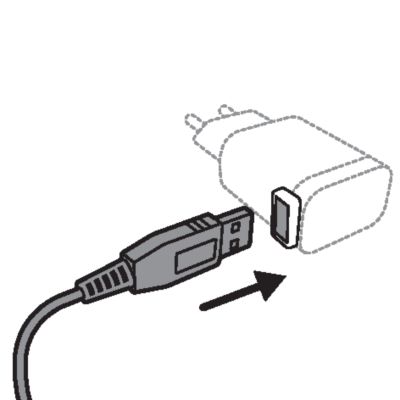
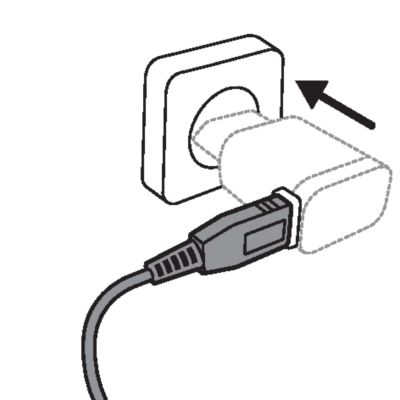
Insert the USB plug into the USB power source (not included).
Insert the USB power source into the power outlet.
After charging, remove the USB power source from the power outlet and pull the small plug out of the appliance.
Always check the appliance and all accessories before use. Do not use the appliance or any accessory if it is damaged, as this may cause injury. Always replace a damaged part with one of the original type.
Because of hygiene, only one person should use the appliance.
Trimming tips
Trimming tips
When trimming for the first time, start by using the comb with the maximum trimming length setting to familiarize yourself with the appliance.
Since all hairs do not grow in the same direction, you may want to try different trimming directions (i.e. upwards, downwards, or across). Practice is best for optimum results.
Always make smooth and gentle movements and be sure the surface of the comb always stays in contact with your skin.
For best results, use the appliance on clean, dry hair, as wet hair tends to stick to the body.
When too many hairs have accumulated on the appliance, remove the hairs before and/or during use, for best trimming results.
Detaching and attaching cutting elements
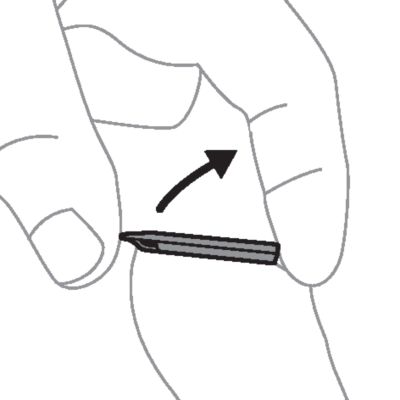
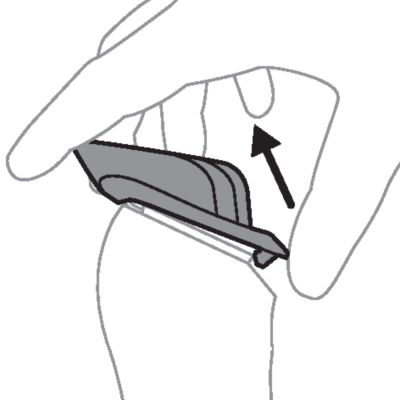
To detach a cutting element, place your thumb below the teeth of the cutting element and gently push upwards until the cutting element comes off the handle.
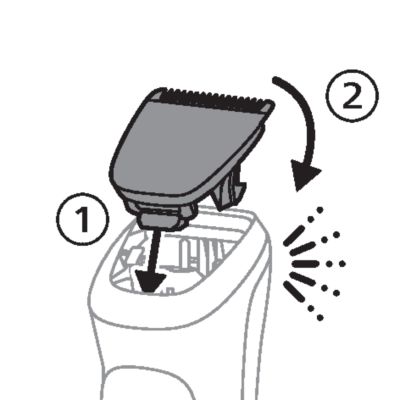
To attach a cutting element, insert the plastic notch at the back of the cutting element into the guiding slot in the handle. Then gently press the teeth of the cutting element downwards until the cutting element clicks into place.
Detaching the nose and ear hair trimmer
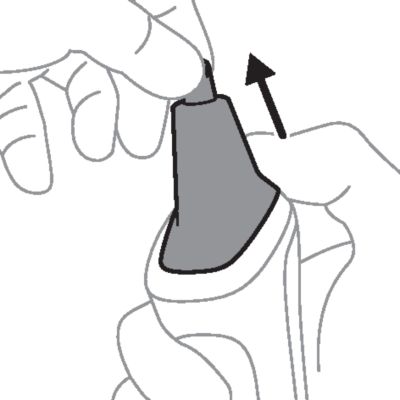
Place your finger on the recess at the back of the attachment and push the attachment off the handle. Use your other hand to prevent the attachment from dropping on the floor.
Detaching and attaching guards
To attach any type of comb onto the cutting element,slide the front part of the comb onto the teeth and press the notch at the back of the comb downwards until it clicks into place.
To detach any type of comb from the cutting element, carefully push its back part off the appliance and then slide it off the cutting element.

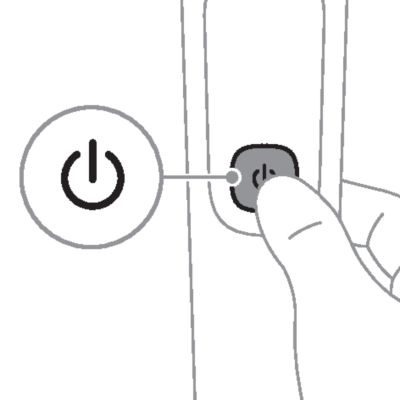
To switch the appliance on or off, press the on/off button once.
Tip
Always comb your beard or moustache with a fine comb before you start trimming.
Beard guards MG7790, MG7750, MG 5790, MG5760, MG5750
Use a stubble or beard comb attached to the cutting element to trim your beard and mustache evenly. The numbers on the combs relate to the number of millimeters of hair length that will remain after trimming.
Attach a stubble or beard comb to the cutting element.
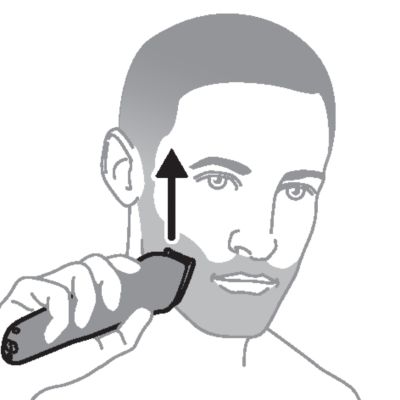
To trim in the most effective way, move the comb against the direction of hair growth. Make sure that the surface of the comb always stays in contact with the skin.
Switch off and clean the appliance after each use.
Full-size hair trimmer
Use the cutting element without any comb to trim hair close to the skin (to a length of ca. 0.5 mm) or to create clean lines around your beard, neck and sideburns.
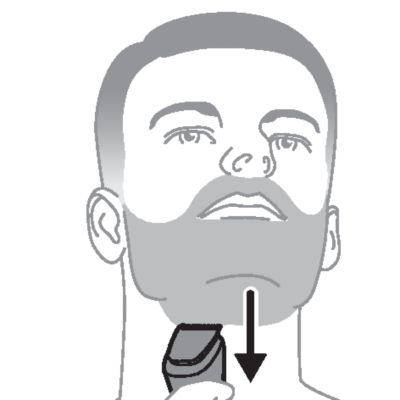
To trim hair close to the skin, place the flat side of the cutting element against your skin and make strokes against the direction of hair growth.
For contouring, hold the cutting element perpendicular to the skin and move it upwards or downwards with gentle pressure.
Switch off and clean the appliance after each use.
Hair clipping tips
Always comb your hair before you start trimming.
For best results, use the appliance on clean, dry hair.
Hair guards
Use a hair comb attached to the cutting element to evenly trim the hairs on your head.The numbers on the combs relate to the number of millimeters of hair length that will remain after trimming.
Attach a hair comb to the cutting element.
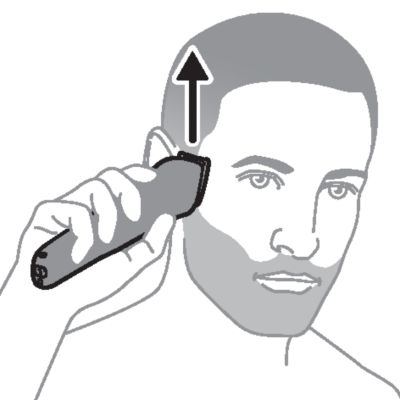
Move the appliance slowly over the crown from different directions to achieve an even result. Always move the appliance against the direction of hair growth. Press lightly. Make sure that the surface of the comb always stays in contact with the skin.
Make overlapping passes over the head to ensure that all hair that should be cut has been cut.
Gently shake the hairs off the appliance in between strokes to prevent hairs from collecting between the cutting element and the comb.
Switch off and clean the appliance after each use.
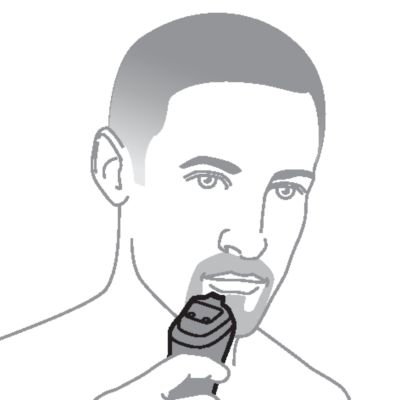
Detail trimmer
Use the precision trimmer to create fine lines and contours around your facial style close to the skin, to a length of 0.5mm.
Hold the precision trimming head perpendicular to the skin and move the trimming head upwards or downwards with gentle pressure.
Switch off and clean the appliance after each use.
Nose trimmer
Use the nose and ear hair trimmer to trim your nose and/or ear hair.
Make sure nasal passages are clean. Make sure outer ear channels are clean and free from wax.
Do not insert the cutting element too deep into your nostrils or ear channels (max. 5 mm).
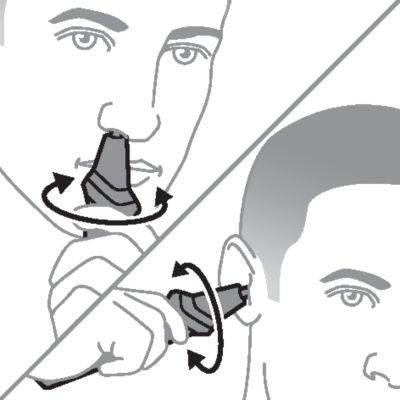
When trimming both nose and ear hair, make firm, rotary movements to ensure that the cutting element reaches all the hairs.
Clean the nose and ear hair trimmer after each use.
Note: The nose and ear hair trimmer is not designed to clean-shave your nostrils or ear canals, but to cut the hairs to a shorter length. Nose and ear hairs have important protective functions and should not be fully removed.
Trimming nose hair
Gently insert the cutting element into one of the nostrils. Move the tip in and out of the nostril in a firm, rotary motion to cut the hairs to a shorter length.
Trimming ear hair
Slowly move the cutting element along the outer ear to trim hairs that stick out beyond the rim.
Gently insert the cutting element into the outer ear canal. Move the tip in and out of the outer ear canal in a firm, rotary motion to cut the hairs to a shorter length.
Never rinse the handle under the tap or immerse it in water. Only the cutting element and the attachments can be rinsed under the tap when detached from the handle.
Switch off the appliance before removing or attaching attachments and before cleaning.
Only use cold or lukewarm water to clean the cutting element and the attachments.
Never use compressed air, scouring pads, abrasive cleaning agents or aggressive liquids such as petrol or acetone to clean the appliance.
Never dry the cutting element with a towel or tissue, as they may get caught in the teeth and cause damage.
Make sure that the appliance is switched off and that the USB power source has been removed from the power outlet and from the appliance.
Wipe the handle with a dry cloth.
Cleaning with brush
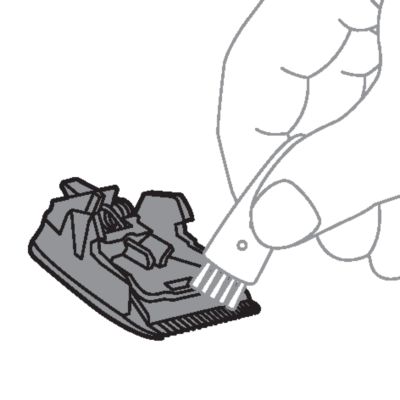
Detach any comb from the appliance and clean it with the cleaning brush.
Detach the cutting element from the appliance. Clean the teeth and the inside of the cutting element with the cleaning brush.
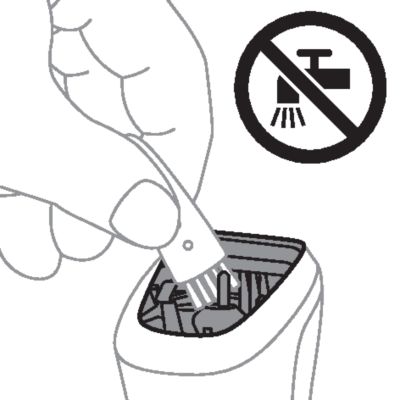
Clean the inside of the hair chamber with the cleaning brush.
Keep the handle away from water. Make sure that no water reaches the inside of the hair chamber.
Cleaning attachments under the tap
Detach any comb and the cutting element from the appliance and rinse them under the tap.
Carefully shake off excess water and let the parts air-dry completely before reattaching them to the appliance.

Cleaning the nose and ear hair trimmer
Clean the nose and ear hair trimmer immediately after use and when a lot of hair or dirt has accumulated on the cutting element.
Detach the nose and ear hair trimmer from the product.
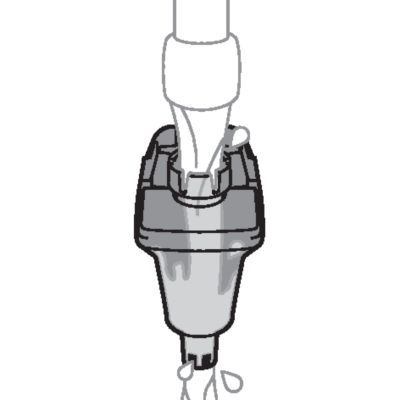
Rinse the nose and ear hair trimmer head under running tap water.
For a thorough clean, immerse the nose and ear hair trimmer head in a bowl with warm water for a few minutes to soak and soften the debris. Then rinse the nose and ear trimmer head under running tap water to remove stubborn debris.
Carefully shake off excess water and let all parts air-dry completely before reattaching them to the product.
Switch off and clean the appliance after each use.
Note: Do not place or store the appliance where it can fall or be pulled into a tub or sink, water or other liquid while plugged in.
Make sure that the appliance is switched off and that the USB power source has been removed from the power outlet and from the appliance.
Do not wrap the USB cable around the appliance when storing.
Store the appliance, the USB power source and all the accessories in the pouch supplied. Attach a comb to the cutting element to protect the teeth during storage.
Place the pouch in a safe, dry location, where it will not be crushed, banged, or subject to damage.
Make sure that the appliance and the accessories are dry before you place them in the pouch.
This product contains a rechargeable NiMH battery which must be disposed of properly.
Contact your local town or city officials for battery disposal information. You can also call 1-888-224-9764 or visit www.call2recycle.ca for battery drop-off locations.
For assistance, visit our website www.philips.com/support or call 1-866-800-9311 toll free.
Your product is designed and manufactured with high quality materials and components, which can be recycled and reused. For recycling information, please contact your local waste management facilities or visit: www.recycle.philips.com.
To buy accessories or spare parts, visit www.philips.com/parts-and-accessories or go to your Philips dealer. You can also contact the Philips Consumer Care Center in your country (see the international warranty leaflet for contact details).
Philips Electronics Ltd (Canada) warrants this new product against defects in materials or workmanship for a period of two years from the date of purchase, and agrees to repair or replace any defective product without charge.
IMPORTANT: This warranty does not cover damage resulting from accident, misuse or abuse, lack of reasonable care, the affixing of any attachment not provided with the product or loss of parts or subjecting the product to any but the specified voltage.*
NO RESPONSIBILITY IS ASSUMED FOR ANY SPECIAL, INCIDENTAL OR CONSEQUENTIAL DAMAGES.
Cutting units and combs are not covered by the terms of this warranty because they are subject to wear and tear.
In order to obtain warranty service, simply go to www.philips.com/support for assistance. It is suggested that for your protection you return shipments of product by insured mail, insurance prepaid. Damage occurring during shipment is not covered by this warranty. NOTE: No other warranty, written or oral, is authorized by Philips Electronics Ltd. This warranty gives you specific legal rights, and you may also have other rights which vary from state to state, province to province or country to country. Some states do not allow the exclusion or limitation of incidental or consequential damages, so the above exclusion and limitations may not apply to you.
*Read enclosed instructions carefully.
Philips support
Is your product not working as it should?
Philips support
Want to know more about your product?